Apple Podcasts Just Added Native Video. Here's What to Know.
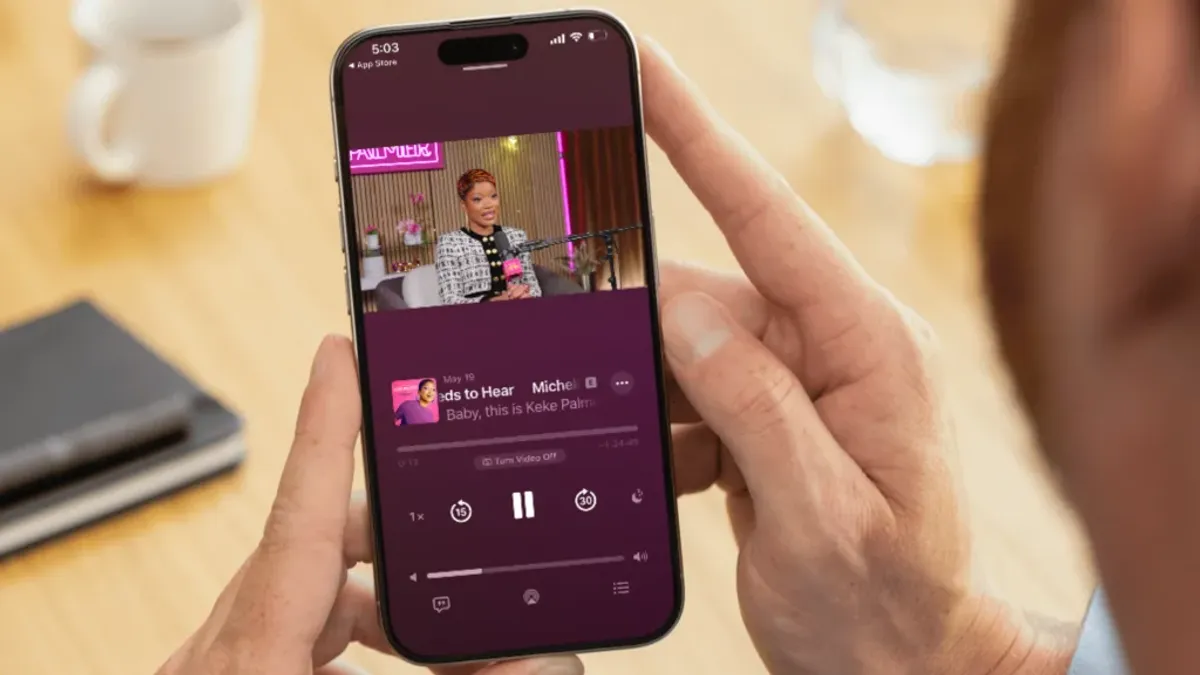
Apple Podcasts now supports native video. What podcasters need to know about the format, which hosts support it, and how it fits with YouTube.
Key Takeaways:
- Apple Podcasts launched a real, usable native video experience in March 2026, but not all hosting platforms support it yet and the setup is still clunky.
- YouTube remains your best tool for video discovery and audience growth. Apple Podcasts video serves your existing audience, not new ones.
- Two issues to know before jumping in: your audio-only listeners will hear your video audio, and your download reporting will get murky.
- Our recommendation: let this get fully baked before you build your workflow around it. We’ll tell you when it’s ready.
The Short Version
Apple Podcasts now supports native video and we are excited about where this is heading. For now though, our advice is simple: if you are doing video, YouTube is still your primary focus. The discovery and reach there is unmatched. As for Apple’s new HLS (HTTP Live Streaming) video feature, it gives your listeners even more reason to love you, and we can see it becoming a real asset for deepening connection with your existing audience. That said, we recommend letting it get fully baked before you build your workflow around it. A few things still need to shake out, and we’ll walk you through them below.
What’s New: The 101
Apple Podcasts has technically supported video for years, but the user experience was pretty rough. Almost nobody used it. Video played in a tiny window, required downloading a massive file to your phone, and involved maintaining a completely separate feed from your audio show.
What launched in late March is a completely different experience. Listeners can now watch your episode right inside the app, go full screen, use picture-in-picture, and flip between watching and listening mid-episode without losing their place. Start listening in the car, get home, switch to video. It actually works pretty well.
Want to See It in Action?
Update to iOS 26.4, open Apple Podcasts, and search for any of these shows that are already live with video: Las Culturistas with Matt Rogers and Bowen Yang, Giggly Squad, Pablo Torre Finds Out, or The Zane Lowe Interview Series.
Worth five minutes of your time so you know what the experience feels like from a listener’s perspective.
How to Think About It: Apple Podcasts vs. YouTube
Here’s the thing about what this does and doesn’t get you. When someone watches your show on YouTube, the platform is actively working for you. It tracks watch time, learns your audience, and surfaces your content to people who have never heard of you. That is a growth engine.
Apple Podcasts is not that, at least not today. It is a follow-and-subscribe model, so your existing listeners can now watch inside the app, which is a nice thing to offer them and likely gives them an even stickier experience with your show.
The way we think about it: YouTube does the hard job of finding you new audiences. Apple Podcasts video, once it is ready, gives your existing audience one more reason to love you.
Those are two different jobs, and right now YouTube is doing the harder one better.
The Catch: Not All Hosts Are There Yet
The new video experience only works if your hosting platform has set up the integration with Apple. At launch there were only four supported hosts: Acast, ART19, Omny Studio, and Simplecast. More have been added since, but plenty of mainstream platforms are still working on it. Check your host’s dashboard or help docs to find out where they stand.
Even if your host does support it, setup is not exactly plug-and-play. We have been talking to a couple of the supported hosts about it and can tell you firsthand: it is not easy yet. It will get easier.
Two Things Worth Knowing Before You Do Jump In
1. Your audio-only listeners will hear your video audio.
There is no separate audio track. Whatever audio is in your video file is what podcast listeners hear. If those are the same thing for you, great. But if you produce a separate, edited audio version of your show, your listeners will hear the unedited video version. And anything that only makes sense as a YouTube CTA or is communicated visually (“check out this chart,” “link on screen”) is going to sound strange to someone just listening.
We predict a separate audio track upload is coming eventually. It is not here yet.
2. Your download numbers are going to get murky.
Apple includes video plays in your analytics but does not break out video and audio separately. So you will not easily be able to tell in Apple Podcasts Connect how many people are watching vs. listening. Your hosting platform will actually have better data than before, since HLS (HTTP Live Streaming) lets them track real watch time rather than just download counts. But Apple’s own dashboard is a blind spot on this for now.
So What Should You Do?
If your host does not support it yet, sit tight. If your host does and your video audio is clean enough to stand alone, it is worth a test. If you are audio-only, nothing changes for you (but let’s talk about adding video)!
We are watching this closely and will update you as the ecosystem matures. This is one of the more interesting developments in podcasting in a while, and we want to make sure our clients are set up to take advantage of it at exactly the right moment, not before.
💡 Not sure how video fits into your podcast strategy? We think about this stuff all day so you don’t have to. Whether you are figuring out YouTube, thinking about what Apple Podcasts video means for your show, or just want a second opinion on your current setup, we are happy to dig in with you. Video editing is an add-on to every podcast production plan we offer.
👉 Book a free strategy call with HiveCast and let’s talk through what makes sense for your show.
Frequently Asked Questions
Do I need to do anything to my existing show to support video?
Not unless your hosting platform supports it and you actively set it up. Your audio-only show will continue working exactly as it always has. Video is opt-in, not automatic.
Which hosting platforms support Apple Podcasts video right now?
The original four at launch were Acast, ART19, Omny Studio, and Simplecast. Since then, Transistor, Riverside, Ausha, and a handful of others have been added. The list is growing. Check your host's help docs or dashboard for the latest.
What if my host isn't on the list yet?
Sit tight. Most major platforms are working on it. There is no reason to switch hosts just to get access to a feature that is still being worked out.
Will my download numbers change when I add video?
They will look different. Apple includes video plays in your overall analytics but does not break out audio vs. video separately, so your numbers may shift in ways that are hard to interpret at first. Your hosting platform will have more granular data than Apple's dashboard.
Can my audio-only listeners still listen normally if I turn on video?
Yes, but here is the catch: they will hear whatever audio is embedded in your video file. If that is the same as your edited podcast audio, no problem. If you produce a separate, polished audio version of your show, they will hear the unedited video audio instead. This is the most important thing to think through before turning video on.
Should I stop posting to YouTube and just use Apple Podcasts for video?
No, absolutely not. YouTube's algorithm actively surfaces your content to people who have never heard of you. Apple Podcasts is a follow-and-subscribe model, meaning it mostly serves your existing audience. They are doing two different jobs. Keep doing YouTube.
When will a separate audio track upload be available?
Apple has not announced it, but we expect it to come. It is one of the most obvious gaps in the current setup and creators are already asking for it loudly. We will update our clients as soon as that changes.
Want this handled for you?
You record the episode, and HiveCast handles the editing, show notes, graphics, and scheduling. We have produced more than 5,000 episodes, and there are no long-term contracts.
More on Podcast Production
Related Articles
How to Make Podcast Clips for YouTube Shorts and Reels
Repurpose your podcast into video: how to find the two or three podcast clips worth cutting from each episode, format them, and post them on a schedule.
Podcast Audio Editing: The 5 Stages of a Professional Pass
Podcast audio editing covers cleanup, levels, content cuts, structure, and a final listen. Here is what a professional pass includes and how to judge one.
Podcast Episode Structure Explained: From Intro to Outro
Master podcast episode structure to boost listener retention and business growth. Get expert tips, segment strategies, and actionable steps. Start now!