Podcast Break: 3 Ways to Keep Your Apple & Spotify Listeners

Take a podcast break without going silent: replays, a Best Of series, or a feed swap, with the Apple episode type for each and a 4-week plan to follow.
Every podcast host needs a podcast break at some point, whether it’s for a product launch, a family commitment, a vacation, or the gap between two seasons. The break itself rarely does the damage. What hurts a show is going silent with no warning, because listeners who expected an episode on Tuesday find nothing and slowly fill that slot with something else.
Our team has produced 5,000+ episodes for business podcasts, and the shows that come back strongest after time off are the ones that planned the break as carefully as a regular month of releases. This guide covers the three ways we use to keep a feed active while the host steps away, how each one works on Apple Podcasts and Spotify, and how to plan the weeks around it.
What a silent podcast break does to your publishing schedule
A consistent publishing schedule is what turns a one-time listener into a regular one. People fit a show into a routine, such as a commute, a workout, or a weekly admin block, and the routine depends on the episode being there. That’s why we treat break planning as part of a show’s podcast strategy rather than something to sort out the week before a trip.
A consistent publishing schedule is what turns a one-time listener into a regular one.
Before choosing an approach, it helps to know what actually changes on each platform when a show stops publishing.
Listeners build habits around your release day
The biggest cost of an unplanned podcast hiatus is lost habit. A listener who skips your show for three or four weeks because nothing new appeared has already replaced that listening time. When you return, you’re competing for a slot you used to own. Keeping content in the feed on the usual day protects that slot even while you’re not recording.
What Apple Podcasts does when you pause
Apple is clear that a gap alone does not cut you off from followers. Its documentation on automatic downloads states that downloads are unaffected if a show does not publish a new episode for 15 days or more. What does pause downloads is listener behavior: if a follower hasn’t played a show for more than 15 days and hasn’t played its latest five episodes, Apple pauses automatic downloads for that show on their device. A silent break gives followers no reason to press play, so the real risk on Apple is drift, not a penalty.
What Spotify’s charts measure
Spotify’s Top Podcasts chart ranks shows by weekly unique audience, and the Trending chart looks at growth, with both updating daily. A week with no new episode usually means fewer people listening that week, which is the number the chart counts. Break content that brings regular listeners back each week keeps that audience figure steadier.
Choosing between the 3 podcast break approaches
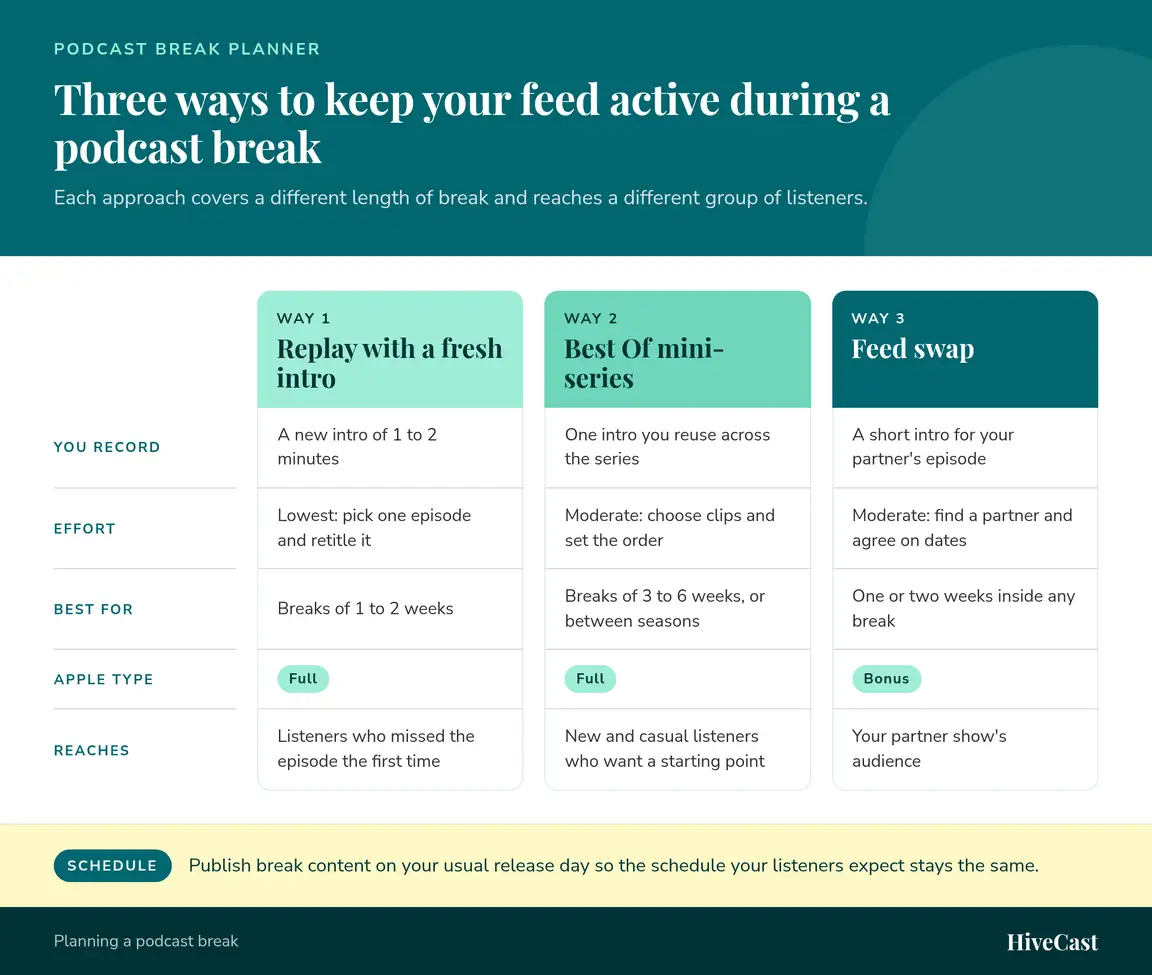
Each of the three approaches covers a different length of break and reaches a different group of listeners. The comparison below shows them side by side, and the sections that follow explain how to run each one.
Way 1: Replay a high-performing episode with a fresh intro
Most of your current listeners haven’t heard your full back catalog. People usually start with recent episodes and rarely work back to the early ones, so a strong older episode is new to a large share of your audience. A replay is the lowest-effort way to cover a short break of one to two weeks: you pick one episode, retitle it, and record a new intro of 1 to 2 minutes.
How to choose the episode
- Start with your analytics. Look for episodes with high completion rates or downloads well above your average.
- Favor evergreen topics. An interview about a principle ages better than one about a news event.
- Pick episodes you’d still stand behind today, or plan to address what has changed in the new intro.
💡 Pick carefully
Favor evergreen topics over ones tied to a news event, and only replay episodes you would still stand behind today.
How to reframe it for today’s listeners
The new intro is what makes a replay feel intentional. Tell listeners why you picked this episode, what has changed since it first aired, and what to listen for. Update the title so it’s clear the episode is a replay, and write it to spark interest rather than apologize. On Apple Podcasts, a replay of your own episode is regular show content, so the Full episode type fits.
A replay also gives you fresh material to promote. Cutting two or three podcast clips from the replay gives your social channels something to post that week, even though you didn’t record a new conversation.
Way 2: Curate a Best Of mini-series for a longer podcast hiatus
When a break runs three to six weeks, or when you’re pausing between seasons, a single replay won’t stretch far enough. A Best Of mini-series of three to five episodes groups your strongest moments around a theme, such as your best guest advice on hiring or every episode about pricing. It takes moderate effort, because you have to choose the clips and set the order, but you only record one intro that you can reuse across the series.
How to build the series
- Pick a theme your audience asks about often. If you aren’t sure, a short listener survey will tell you which topics people want more of.
- Pull the strongest segment from each episode rather than replaying whole episodes, which keeps each installment tight.
- Record one intro explaining that you’re sharing curated highlights for the next few weeks and when new episodes return.
- Publish each installment on your regular release day.
A Best Of series works especially well for new and casual listeners who want a starting point. It does the same job as a starter playlist: it gives someone who just found your show a short, high-quality path into your back catalog.
Using a podcast season break on Apple and Spotify
If your show runs in seasons, the Best Of series can bridge the gap between them, and both platforms give you tools for it. Apple’s guide to episode order explains that serial shows with season numbers display the newest season by default, and that Apple presents the trailer for the latest season. On Spotify, a trailer appears at the top of your show page, and shows hosted elsewhere can set an existing episode as the trailer in Spotify for Creators. Publishing a short trailer for the next season near the end of your break tells new visitors on both apps that the show is coming back.
Way 3: Run a podcast feed swap with a similar show
A feed swap means you publish an episode from another podcast in your feed, and that show publishes one of yours in theirs. It covers one or two weeks inside any break and does something the other two approaches can’t: it puts your show in front of your partner show’s audience, a group of listeners who already like your subject.
How to choose a swap partner
The best swaps happen between shows with similar audiences and different angles. A podcast for coaches might swap with a show for consultants, or a marketing show with a sales show. Download numbers matter less than audience fit, so don’t hold out for a partner exactly your size. Expect moderate effort here, since you’ll need to find a partner, agree on dates, and exchange files.
How to publish the swap episode
Record a short intro for your partner’s episode that explains why you chose it and what your listeners will get from it. That intro signals that the episode is a recommendation, not a gap in your schedule. On Apple Podcasts, the guide to episode types lists cross-promotional content for another show as one of the uses of the Bonus type, so mark the swap episode as Bonus. Ask your partner to do the same with your episode in their feed.
🔴 Mark it correctly
Apple lists cross-promotional content as a use for the Bonus episode type, so mark your swap episode as Bonus rather than a regular Full episode.
How to plan a podcast break around consistency
Whichever approach you choose, the plan around it matters as much as the content. A break that listeners know about in advance feels like part of the show. These steps keep your consistency intact from the last new episode to the first one back.
Four weeks out: choose the length and the approach
Decide how long you’ll be away, then match the approach to the length. A replay suits one to two weeks, a Best Of series suits three to six weeks or a gap between seasons, and a feed swap can fill one or two weeks inside either. Many shows combine them, such as two Best Of installments with a swap in the middle.
Two weeks out: record intros and prepare the episodes
Record every new intro you need in one session while you still have time. Choose the replay episodes, pull the Best Of segments, and confirm swap dates with your partner. Scheduling all the break episodes before you leave means nothing depends on you once the break starts.
In your last new episode: announce the break
Tell listeners how long the break will last, what they’ll hear in the meantime, and when new episodes return. Repeat the same details in the show notes and on your social channels. If your break falls in December, our guide to podcasting through the holiday season covers themed episodes and seasonal planning in more detail.
On your return: come back with a strong episode
Make your first new episode one of your best, with a guest or topic you’ve been saving. Mention it in the final break episode so regular listeners know it’s coming.
How long can you pause a podcast?
You can pause a podcast for as long as you need if the feed stays active, because the gap your listeners notice is the gap in your publishing schedule, not the gap in your recording schedule. Without break content, we see regular listeners start to drift after one or two missed releases, and the longer the silence, the more of them settle into other shows. With replays, a Best Of series, or a swap in place, a break of four to six weeks is manageable for most business podcasts.
For breaks longer than that, such as a full season off, plan the return as a relaunch. Publish a trailer for the new season, update your show description and artwork if anything has changed, and promote the first episode back the way you’d promote a launch.
Planning your next podcast break before you need it
A podcast break works best when it’s planned well before you need it. Choose the approach that fits the length of your time off, record the new intros in one session, tell listeners what to expect, and keep publishing on your usual day so the habit you’ve built stays in place. A replay, a Best Of series, or a feed swap each keeps your show present on Apple Podcasts and Spotify while you step away.
Our team handles this kind of planning for business podcasts every month, from scheduling replays to producing a full Best Of series. Schedule a free discovery call and we’ll help you map out your next break.
Frequently Asked Questions About Taking a Podcast Break
How long can I take a podcast break before listeners drift away?
There is no published cutoff, but in our experience a gap of one or two weeks with no explanation is when regular listeners start filling that slot with other shows. If you keep something in the feed on your usual release day, such as a replay, a Best Of episode, or a feed swap, the length of the break matters much less, because your publishing schedule never stops.
Does a podcast break hurt my ranking on Apple Podcasts or Spotify?
Apple says automatic downloads for your followers are unaffected if a show does not publish for 15 days or more, so a gap alone does not cut you off from your audience. The risk is listening. Spotify's Top Podcasts chart is based on weekly unique audience, so weeks with fewer listeners can lower your position. Publishing break content on schedule keeps those weekly listens coming in.
Should a replay be marked as a bonus episode on Apple Podcasts?
Usually not. A replay of one of your own episodes is regular show content, so the Full episode type fits. Apple describes Bonus episodes as extra content, such as behind-the-scenes material, or cross-promotional content for another show, which makes Bonus the better fit for a feed swap episode.
What should I say when I announce a podcast hiatus?
Tell listeners three things in your last new episode and its show notes: how long the break will last, what they will hear in the meantime, and the date new episodes return. Keep it to a minute or less and frame it around what is coming next. A clear return date gives regular listeners a reason to keep the show in their queue.
Can HiveCast produce my replays and Best Of episodes while I'm away?
Yes. You record the new intros and send them to us, and our team edits the episodes, writes the show notes, builds the graphics, and schedules everything to Apple Podcasts, Spotify and all the major directories on a 5-business-day turnaround. Your dedicated account manager keeps the release dates on track while you are away.
What does done-for-you podcast production cost with HiveCast?
Plans are $500 per month for bi-weekly episodes and $875 per month for weekly episodes, with no long-term contracts. Unused episodes roll over, 1 episode forward per month, which helps when a planned break means you record fewer episodes than usual.
Want this handled for you?
You record the episode, and HiveCast handles the editing, show notes, graphics, and scheduling. We have produced more than 5,000 episodes, and there are no long-term contracts.
More on Podcast Strategy
Related Articles

Podcast for Business: 5 Ways Experts Win Clients With a Show
A podcast for business does five jobs, from warming up prospects to earning search traffic. See what to track for each, written for coaches and experts.

How to Turn Podcast Clips Into Leads With ManyChat
Learn how to use ManyChat podcast clips and turn Instagram engagement into leads with automated DMs, smarter CTAs, and a better podcast funnel.
Spotify’s New Play Count: What the 30-Second Rule Means
Spotify now counts a play only after 30 seconds. Here is why your numbers may drop, what the new creator analytics show, and how to respond.