How to Use Apple Podcasts Deep Links to Get More Subscribers
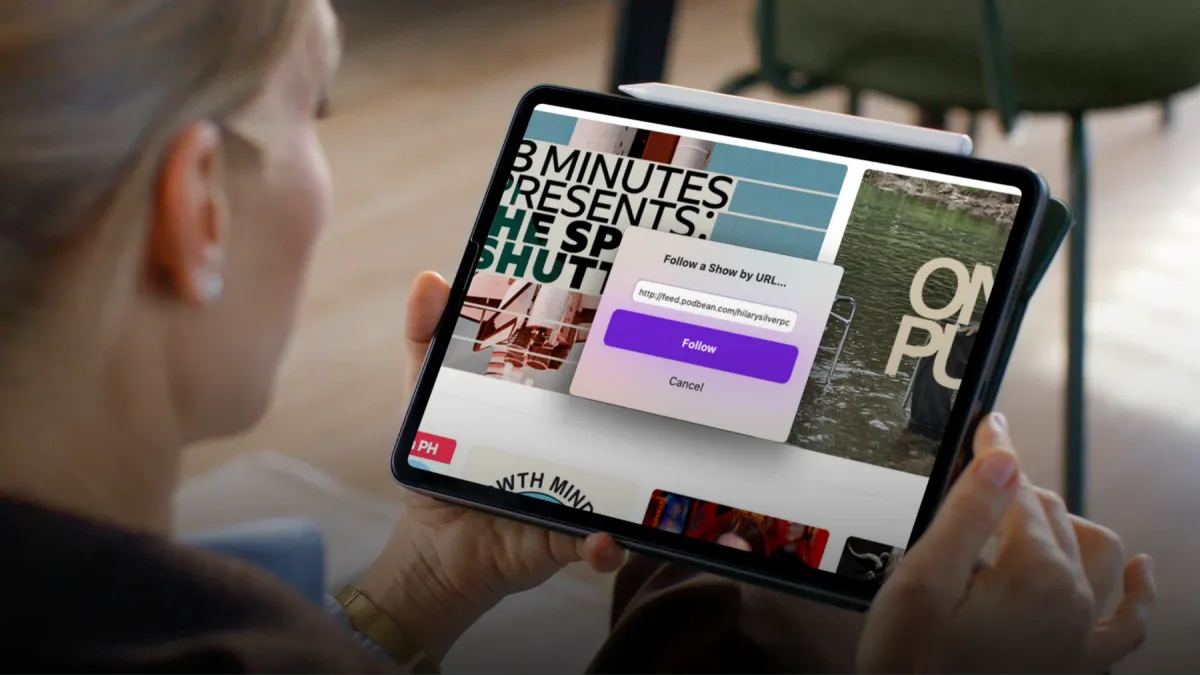
Apple Podcasts deep links open straight in the app with Follow ready to tap. Learn how to build them and cut the friction costing you subscribers.
As of 2025, there are over 4.52 million podcasts worldwide, with nearly 487,200 new shows launched in just the past three months. In this crowded market, every click matters. If you’re sending potential listeners to your show with a generic Apple Podcasts URL, you’re adding unnecessary steps that could cost you subscribers.
A standard link might open in a browser first, then require the listener to tap again to open the Apple Podcasts app, and finally search for the “Follow” button. Each extra tap increases the chance they’ll abandon the process.
The fix? Apple Podcasts deep links.
These special links open directly inside the Apple Podcasts app, right on your show page, with the purple Follow button ready to tap. No browser. No searching. No distractions, just one click, and they’re subscribed.
How to Create an Apple Podcasts Deep Link
Apple Podcasts deep links are especially powerful because they can take users directly to the “Follow” prompt. Here’s how to make one in under 2 minutes:
- Get Your RSS Feed: You’ll find this in your podcast host dashboard.
Example: https://feed.podbean.com/yourshowname/feed.xml
- Swap the Start Change https:// to podcast://
Example: podcast://feed.podbean.com/yourshowname/feed.xml
- Test It: Paste the link into a browser on an Apple device. You should see a purple Follow button pop up.
Note: This works only for Apple Podcasts on Apple devices.
Why Apple Podcasts Deep Links Work
Deep links aren’t just convenient, they’re designed to convert. By removing extra steps, you eliminate the friction that causes potential subscribers to drop off.
Here’s why they’re so effective:
- Reduced friction – No searching, no app-switching, no wasted taps.
- Immediate action – The “Follow” button is the first thing they see.
- Higher conversion rates – Less effort means more listeners become subscribers.
In short, deep links make subscribing to your podcast effortless, and that simplicity drives results.
Where to Use Your Apple Podcasts Deep Link
Once you’ve created your deep link, make it the primary subscribe link across all your touchpoints:
- Email campaigns & signatures – Every message becomes a subscriber opportunity.
- Social media bios & stories – Instagram, Facebook, LinkedIn. Make it easy everywhere.
- Show notes & blog posts – Include it as the top call-to-action.
- Event materials – Turn QR codes on flyers, business cards, or merch into instant follow links.
The more places your deep link appears, the more effortless it becomes for potential listeners to subscribe. Over time, swapping generic Apple Podcasts URLs for deep links can significantly boost your follower count, without spending a dollar more on promotion. Deep links are one line on the podcast SEO checklist we work through for every show we publish.
Want this handled for you?
You record the episode, and HiveCast handles the editing, show notes, graphics, and scheduling. We have produced more than 5,000 episodes, and there are no long-term contracts.
More on Podcast SEO
Related Articles
Podcast SEO: How to Get Your Show Found in Search
Podcast SEO works in two places: the search inside Apple and Spotify, and the episode pages Google reads. Here is what to fix in each, and in what order.
Search Console Now Links Your Social: What It Means
Learn what Google Search Console for YouTube means for podcasters, what data it shows, and how to use it to improve discoverability.
5 Tips to Rank Higher on Apple Podcasts in 2026
Rank higher on Apple Podcasts in 2026: optimize metadata, earn more follows, improve retention, and turn Search and Top Charts into discovery.