Podcast SEO: How to Get Your Show Found in Search
Podcast SEO works in two places: the search inside Apple and Spotify, and the episode pages Google reads. Here is what to fix in each, and in what order.
Most hosts who ask why their show is not growing have a production problem in mind. They want to talk about microphones, editing, or how often they should publish. The episodes are usually fine. They lack podcast SEO, the work that makes search send listeners to them.
Search is one of the main ways new listeners find a show. Someone types a few words into Apple Podcasts, Spotify, Google, or YouTube, and your show either comes back or it does not. If the words in your show title, your episode titles, and your episode pages do not match the words your audience uses, the search box has nothing to work with.
That matching problem is what podcast SEO solves. It is less mysterious than the term makes it sound, and most of it is metadata you already control.
What podcast SEO actually is
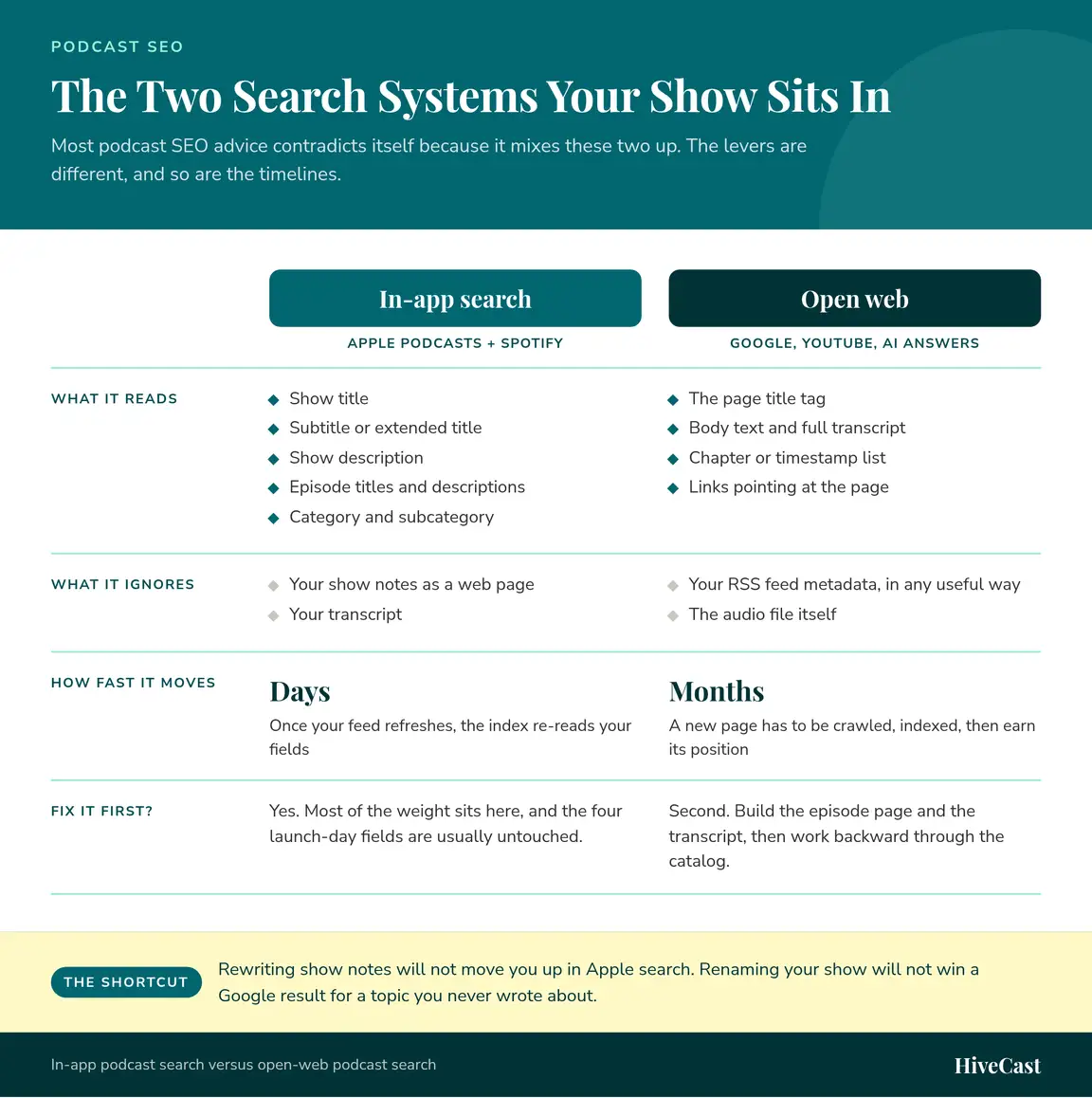
Podcast SEO covers two separate systems that most articles blur together, which is why the advice you have read probably contradicts itself.
System one: in-app discovery
Apple Podcasts and Spotify run their own search over the metadata in your RSS feed. Five fields do the work:
- Your show title
- Your subtitle, which some feeds call the extended title
- Your show description
- Your episode titles and episode descriptions
- Your category and subcategory
They do not index your show notes as a web page, and they do not read your transcript. Most of the weight sits here, and it is the half to fix first.
System two: open-web discovery
Google, YouTube, and AI answer engines do not read your RSS feed in any useful way. They index the page your episode lives on, which means four different things matter:
- The title tag on the page
- The body text, including the full transcript
- The chapter or timestamp list
- The links pointing at the page, from your own site and from elsewhere
This is the only side where show notes affect ranking.
Why the split matters
Sorting your work into those two buckets prevents most wasted effort. Rewriting show notes will not move you up in Apple search. Renaming your show will not win you a Google result for a topic you have never written about.
Part one: getting found inside Apple and Spotify
Four decisions carry most of the weight in app search: your show title, your subtitle or extended title, your show description, and your category. Podcasters tend to set all four at launch and never revisit them, which is why they are usually the quickest wins available.
Your show title
Your show title is the heaviest single signal in app search, and it is the field most often wasted. A clever two-word name with no subject in it gives the index nothing to match.
Your show title is the heaviest single signal in app search, and it is the field most often wasted.
The fix is a name plus a plain statement of the subject:
- Before: “Second Cup”
- After: “Second Cup: Leadership Conversations for New Managers”
The brand survives and the searchable words arrive with it. Two limits on the field are worth knowing:
- Keep the whole thing readable at the length a phone displays, which is short. If a listener cannot tell what the show covers from the title alone, the index cannot either.
- Do not pack the title with terms. A title that reads as a keyword list gives a listener no reason to tap it, and both platforms are willing to reject feeds that abuse the field.
There is more on how the two ranking systems inside Apple Podcasts treat metadata versus listener behavior if you want the detail.
Your subtitle
Your subtitle, which some feeds call the extended title, is the second field the index reads and the one most shows leave empty or fill with a slogan. Use it for the words a listener would type that did not fit in the title: the audience, the format, or the problem you cover.
Your show description
Your show description should say who the show is for and what a listener gets, in plain sentences, with the important part in the first two lines. App interfaces truncate descriptions, so the opening sentence does most of the work.
- Write it for a person deciding whether to press follow, then check that the terms you want to be found for appear in it naturally.
- Revisit it. A description written in launch week tends to sit untouched for years, so put a review on the calendar.
Your category and subcategory
Your category decides which charts and browse shelves you are eligible to appear in, and it deserves more research than most shows give it.
The twenty-minute check
- Open the category you are considering in Apple Podcasts.
- Read the top 20 shows in it, including the subtitles and descriptions.
- Ask whether a listener who likes those shows would like yours.
- Repeat for the narrowest subcategory you might genuinely belong in.
Reading the answer
- A no means you are in the wrong category, and visibility in front of the wrong audience works against you. Those listeners press play, stop early, and do not follow, and that behavior is exactly what app search and the charts measure. A narrower subcategory you genuinely fit usually outperforms a broad one where nobody notices you.
- Do not pick a category because it looks less competitive. A low-competition category you do not fit puts your show in front of listeners who will not follow it.
⚠️ Wrong category risk
Visibility in front of the wrong audience works against you. Listeners who don’t fit a show tend to stop early, and that behavior is exactly what app search and the charts measure.
Episode titles
Every episode you publish is another entry in the index, which makes episode titles the lever you pull most often. Searchable beats clever here, and the distance between the two is usually one rewrite.
Compare two titles for the same episode:
- “Episode 112: Talking Shop” tells a listener nothing and gives the index nothing to match.
- “How to Price a Retainer Without Losing the Client” names a topic people search for and gives a listener a reason to press play.
Three habits fix most episode titles:
- Move the episode number out of the front, since it occupies the space both the index and the reader look at first and nobody searches for a number.
- Put guest names after the subject rather than before it, unless the guest is the reason people are searching.
- Front-load the topic. Google truncates long title links and podcast apps cut them even shorter, so the first few words have to carry the meaning. There are more patterns for episode titles that stay searchable without sounding generic.
Part two: getting found on Google and YouTube
Everything above happens inside two apps. The rest of search works on pages, which means your website is the asset, and the audio file is just what the page links to.
The episode page
Every episode needs a page of its own on your site with a URL that does not change. That page is what Google can crawl, index, and send people to.
Three things belong on it:
- Written show notes that summarize the episode, name the topics by their real names, and link to whatever you referenced.
- A full transcript, which is the largest block of relevant text you will ever publish about that episode and the reason specific, long queries find episodes at all. It does double duty: the federal guidance on captions and transcripts treats a transcript as the way audio content becomes available to people who cannot use the audio.
- Chapters or timestamps, so a reader can see the structure and jump to the part they came for.
Show notes deserve an honest note. Because AI tools make them easy to draft, a competent set of show notes is the baseline rather than an edge. They still need to exist, they still help a reader decide, and they are part of every episode we produce. They are not what separates your page from the other pages covering the same subject. The transcript, the internal links from related pages on your site, and the simple fact that a stable page exists do more of that work.
YouTube as a search engine
YouTube is a search engine with a video player attached, and it ranks on text: the video title, the description, the tags, and the captions it generates from your audio. Publishing full episodes on YouTube adds a second indexable surface with its own search results and its own recommendation feed.
Two things to settle before you commit to a weekly video:
- The cost. Video editing is a paid add-on rather than part of core audio production, so decide whether the extra reach is worth the money first.
- The copy. Write the video title and description for YouTube search instead of pasting in the audio episode title, because the two audiences search differently.
AI answer engines
Assistants and AI summaries answer questions by reading text. Your audio is not text to them, so an episode with no page and no transcript gives them nothing to quote or cite.
Nobody has a reliable playbook for ranking inside an AI answer yet, and anyone selling one is guessing. The practical steps are unglamorous:
- Publish a real page for the episode.
- Publish the full transcript on it.
- Answer the specific question somewhere in plain language, in a sentence that stands on its own.
- Make sure your name and the show name appear together on the page.
How to do keyword research for a podcast
You do not need a paid tool to build a year of useful episode topics. A paid tool gives you search volume and saves time, and we use one for client work, but the free version of this process gets you most of the way in an afternoon.
- Write down what people actually ask you. Pull the real phrasing out of sales calls, client emails, webinar questions, and DMs. These are the words your audience uses, which matters more than any volume number.
- Type each phrase into Apple Podcasts and Spotify. Look at whether shows or individual episodes come back, and whether the results are actually relevant. A search that returns nothing on-topic is an opening.
- Type the same phrase into Google and YouTube. Autocomplete, related searches, and the people-also-ask box hand you real variants for free, including the longer questions that make good episode titles.
- Decide which half each phrase belongs to. Phrases people would type into a podcast app go into your show and episode metadata. Phrases people would type into Google go into episode page titles and show notes. Some belong in both.
- Assign one phrase per episode and put it in the title. One topic per episode, named in the title, beats an episode that touches five subjects and names none of them.
What to do with a back catalog
Retitling and re-describing old episodes still works, and for a show with a year or more of archive it is the fastest return on the board. The audio file stays where it is, the URL stays where it is, and your updated metadata propagates the next time the apps refresh your feed.
Work in priority order:
- The ten episodes that already get the most plays. Those subjects have proven they interest people.
- Episodes whose subject matches a phrase you want to be found for but whose title hides it. These are the cheapest wins on the list.
- Everything else, oldest first, if you still have the appetite for it.
For each one: rewrite the title so it names the topic, rewrite the first two lines of the description, and add a transcript to the page if it does not have one.
Two things to avoid while you do it:
- Never change an episode GUID or an audio URL. That is what breaks a feed, and it can drop episodes out of apps entirely.
- Do not retitle so aggressively that a returning listener cannot find the episode they remember. Keeping the original phrasing somewhere in the description solves this.
🔴 Protect your feed
Never change an episode GUID or the audio URL when you update an old episode. That is what breaks a feed and can drop episodes out of apps.
A realistic timeline
Three things move at different speeds, and expecting them on the same schedule is why this work gets abandoned early.
| What moves | What drives it | How long it takes |
|---|---|---|
| Position in app search | The metadata in your feed | Days, once the feed refreshes |
| Follows, plays, completion rate | Your publishing schedule | Weeks to months |
| Position in Google results | Crawling, indexing, and competition | Months |
Open-web results are the slowest of the three, because a new episode page has to be crawled, indexed, and then earn its position against pages that have been live for years. Your early pages usually move before later ones, since your site is still building a track record on the topic.
The reason this work is worth doing anyway is that it keeps paying. An episode titled well in January is still collecting searches in November, which is not true of a social post. Improving your directory rankings and your episode pages adds up over a year in a way that individual promotion pushes do not, as long as the metadata underneath is right.
Where to start
If you are doing this yourself, the order matters:
- Fix the four app-search fields: show title, subtitle, description, and category.
- Make new episode titles searchable, starting with the next one you publish.
- Build real episode pages with show notes and a full transcript on each.
- Work backward through the catalog, highest-played episodes first.
Our podcast SEO service runs that sequence for clients, and because it sits alongside podcast production, the metadata gets written with the episode instead of a year later. There are more tactics in our podcast SEO library if you want to keep reading. If you would rather have someone look at your feed with you, book a call and we will go through it.
Frequently Asked Questions About Podcast SEO
What is podcast SEO?
Podcast SEO is the work of making your show findable in the places people search for it. That splits into two systems: the search engines inside Apple Podcasts and Spotify, which read the metadata in your RSS feed, and the open web, where Google and YouTube index the page your episode lives on. The tactics are different for each, and confusing them is why most podcast SEO advice feels contradictory.
Do show notes help podcast SEO?
They help on the open web and do nothing inside the apps. Apple and Spotify do not index show notes as a web page, so a rewrite there will not change your position in app search. On your own episode page, show notes and a full transcript are the text Google has to work with, which is where they earn their keep.
How do I get my podcast to show up on Google?
Give every episode a page of its own on your site with a stable URL, a descriptive title tag, written show notes, and a full transcript. Google indexes that page, not your audio file. Then link to the page from related pages on your site so it is not sitting on its own.
How long does podcast SEO take to work?
App search reacts to metadata changes quickly, often within a few days of your feed refreshing, because the index just re-reads your fields. Open-web results take months, since a new page has to be crawled, indexed, and then earn its position against pages that have been live for years. The engagement half, follows and plays and completion, moves at the pace of your publishing schedule.
Can I improve SEO on episodes I already published?
Yes, and it is usually the highest-return work available. Rewriting the title and the first two lines of the description on an old episode makes it findable without touching the audio, and the episode keeps its place in every listener’s app. Leave the episode GUID and the audio URL alone, because changing either one is what breaks a feed.
Does YouTube help podcast SEO?
It gives you a second search surface with its own results and its own recommendation feed, and it ranks on text: the video title, the description, and the captions generated from your audio. A video version of a show is a paid add-on rather than part of core audio production, so it is worth deciding whether the extra reach justifies the cost before committing. If you publish there, write the title and description for search rather than reusing the audio episode title unchanged.
Want this handled for you?
You record the episode, and HiveCast handles the editing, show notes, graphics, and scheduling. We have produced more than 5,000 episodes, and there are no long-term contracts.
More on Podcast SEO
Related Articles
Search Console Now Links Your Social: What It Means
Learn what Google Search Console for YouTube means for podcasters, what data it shows, and how to use it to improve discoverability.
5 Tips to Rank Higher on Apple Podcasts in 2026
Rank higher on Apple Podcasts in 2026: optimize metadata, earn more follows, improve retention, and turn Search and Top Charts into discovery.
How to Use Apple Podcasts Deep Links to Get More Subscribers
Apple Podcasts deep links open straight in the app with Follow ready to tap. Learn how to build them and cut the friction costing you subscribers.