Business Podcast Show Notes: A 6-Section Template

A 6-section podcast show notes template for coaches, consultants and experts, plus why AI-written show notes won't help without a keyword plan behind them.
Podcast show notes are the written text that travels with every episode you publish. They sit under the play button in Apple Podcasts and Spotify, and they fill the episode page on your own website. For a business podcast, they have two jobs: give a new listener a reason to press play, and give search engines words to match against what people type.
Most show notes do neither job well, because they are written as a recap after the fact. This guide is the template our team uses on client episodes, with the six sections in the order we write them, plus where show notes actually get read by search and why AI-written notes rarely help without a plan behind them.
What podcast show notes do for a business podcast
Before the template, it helps to be clear about what show notes can and cannot do, because that decides how much effort they deserve.
Show notes are one small part of podcast SEO, the work of making a show easier to find in podcast apps, on Google, and in AI answers. They support the bigger levers, such as episode titles and directory listings. That is also why our Podcast SEO service is named for the whole job, with show notes as one deliverable inside it.
Within that scope, good show notes do three things for a business owner:
- They give a new listener context. Someone deciding whether to spend 40 minutes on your episode reads the first two lines and decides from those.
- They give your episode page text. An audio file has no words a search engine can read, so the show notes are the page’s content.
- They move listeners toward a next step. A listener who wants your offer, your newsletter, or the guest’s book needs a link to click.
An audio file has no words a search engine can read, so the show notes are the page’s content.
If you also publish the episode on YouTube, the description there does a different job from the show notes. We cover the six differences in our guide to YouTube descriptions, so this article stays with the show notes themselves.
Where show notes get indexed, and where they don’t
A common claim is that podcast apps index every word of your show notes. The platforms’ own documentation is more specific than that, and it changes where you should put your effort.
Inside podcast apps
Apple’s guide to how search works on Apple Podcasts lists the metadata it uses as the show name, the channel name, and the episode title, alongside popularity and how listeners engage with results. Episode descriptions are not on that list. Inside the app, your episode title carries most of the search weight, which is why we write episode titles and show notes around the same phrase.
ℹ️ Good to know
Apple’s documentation lists the show name, channel name, and episode title as what its search reads. Episode descriptions are not on that list.
Show notes still matter inside the app. They are what a browsing listener reads after search has done its job, and a clear summary is what turns a search result into a play.
On the web
The bigger search role for show notes is on your website. An episode page is a regular web page, and Google’s SEO Starter Guide advises writers to think about the words a reader might search for and to use them naturally in the content. Show notes are that content. Without them, the episode page is a player and a title, with nothing for Google to rank.
People do search the web for shows. In Edison Research’s Podcast Consumer 2025 report, 15% of U.S. podcast listeners aged 13 to 24 said they discover podcasts most often by searching the internet. That figure covers one age group, but it shows that web search is a real route to new listeners, and the episode page is where that route lands.
Show notes are one input to podcast discoverability. Directory listings, categories, and consistent publishing carry as much weight, and we cover those in our guide to podcast discoverability across the major directories.
A podcast show notes template in 6 sections
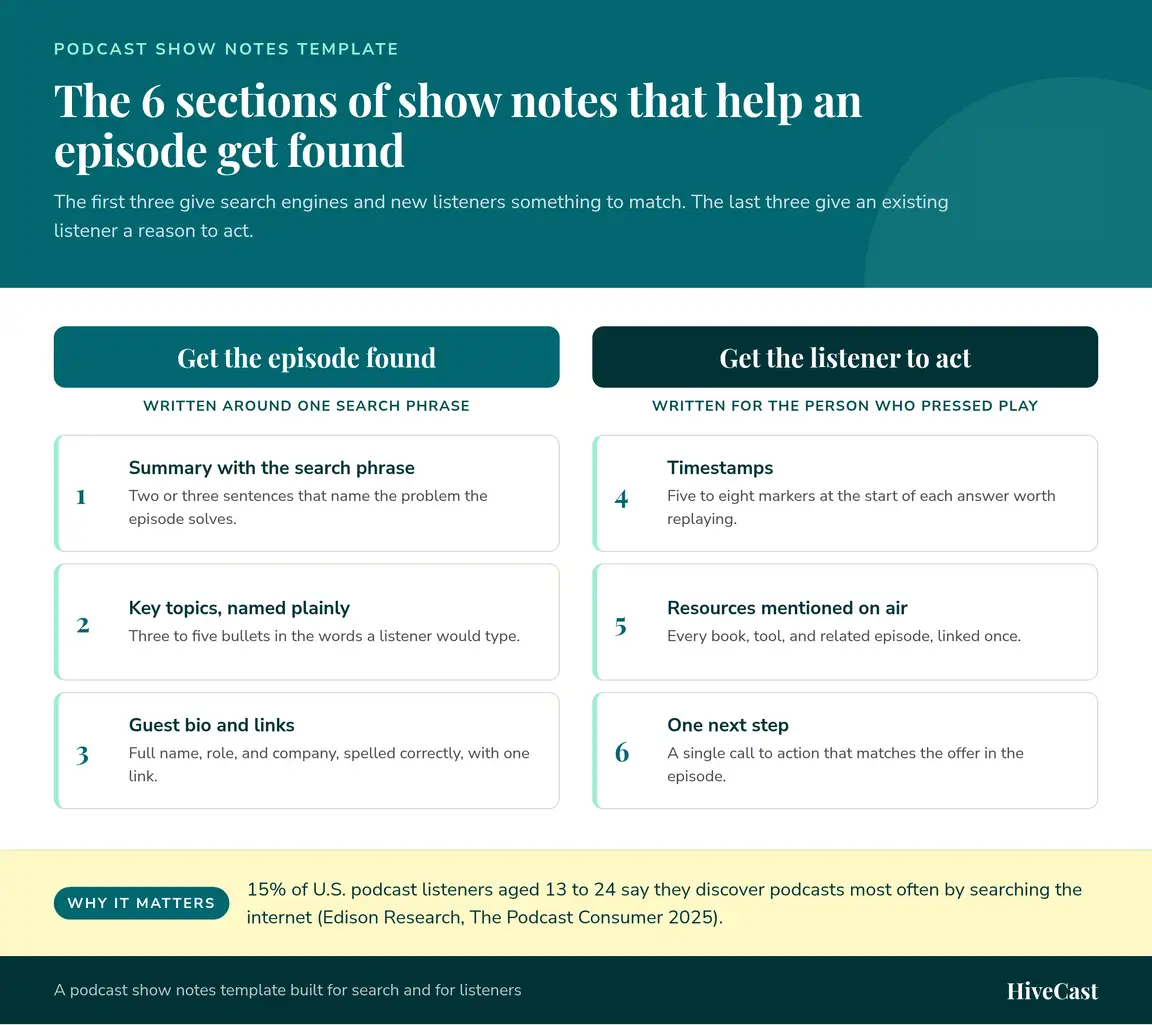
This is the podcast show notes template we use on client episodes. The first three sections help the episode get found, and the last three help a listener act once they have pressed play. Keep the order the same on every episode, so returning listeners always know where to look.
1. A summary built on one search phrase
Write two or three sentences that say what problem the episode solves and who it is for. Choose one phrase you want the episode found for, and use it in the first sentence the way a listener would say it out loud. A summary that opens with “How coaches can price a group program” gives search something to match, while “Our most exciting conversation yet” gives it nothing, because nobody searches for that.
2. Key topics, named plainly
List three to five topics as bullets, in the words a listener would type into a search box. Use the real names of the methods, tools, and ideas from the episode, not the clever phrasing you used on air. This section is where a skimmer decides whether the episode covers the question they came with.
3. Guest bio and links
Give the guest’s full name, role, and company in two or three lines, spelled exactly as they spell it. Add one link to their website or main profile. A guest who sees their name and business presented correctly is far more likely to share the episode with their own audience.
4. Timestamps
Add five to eight timestamps that point to the start of each answer worth replaying. Check them against the final edit, because a timestamp that drops the listener into the middle of a sentence is worse than none.
💡 Check before publish
Check every timestamp against the final edit. One that drops a listener mid-sentence hurts more than having no timestamps at all.
5. Resources mentioned on air
Link every book, tool, study, and related episode mentioned in the conversation. Linking to an older episode on the same topic keeps listeners in your catalog and gives search engines a path between your episode pages.
6. One next step
End with a single call to action that matches what you offered in the episode, such as a discovery call, a free guide, or a newsletter. One clear next step gets more clicks than a list of five links, and it lets you measure what the episode actually did.
Why AI-written show notes won’t move your results on their own
We take a clear position on this. AI-written show notes can describe an episode, but without a deliberate discoverability strategy behind them, they will not change how often your show is found.
An AI tool summarizes what was said in the recording. It has no way of knowing what your show is trying to rank for, so it cannot make the decisions that drive results:
- Which phrase this episode should own. Picking that phrase takes keyword research and a view of what your other episodes already cover.
- Which older episodes to link. That depends on your back catalog and your offers, which a transcript does not contain.
- How the notes line up with the title and the listing. A summary that targets one phrase while the title targets another splits the episode’s signal.
- What the episode is meant to sell. The next step should point to a specific offer, and the tool does not know your offers.
There is also a sameness problem. Every podcaster now has access to the same tools, so AI summaries across a category read alike. When every show in your niche publishes a competent recap, the recap stops setting anyone apart.
Show notes don’t need to take long to write once the strategy is set, which is why our team decides the phrase and the links before anyone writes the summary. Our guide to podcast SEO explains how show notes fit with titles, directories, and episode pages as one system.
How to tell whether your show notes are working
Show notes are easy to measure once your episode pages live on your own website, so it is worth checking a few numbers each month.
Search and traffic
Look at how many visits each episode page gets from search, and which queries brought people there. If an episode page earns visits for the phrase in its summary, the template is doing its job. If it earns none after a few months, compare its title and summary to see whether they target the same phrase.
Clicks on the next step
Add UTM tags to the link in section six, so your analytics show which episode sent each click and sign-up. Over a quarter, this tells you which topics bring in leads, which is useful input for planning future episodes.
Time on page and repeat visits
Readers who stay on an episode page and come back to others are using your timestamps and resource links. Low time on page with high traffic usually means the summary promised something the episode did not deliver.
Making show notes part of a discoverability plan
Podcast show notes pay off when they follow a plan: one search phrase per episode, a template that stays the same, links that connect your episodes to each other, and a single next step. On their own, they are a small lever. Combined with strong episode titles, accurate directory listings, and steady promotion, they help a business podcast get found by the people it was made for.
That is how we handle show notes for the coaches, consultants, authors, and experts we work with, across the 5,000+ episodes our team has produced. SEO show notes are included in every HiveCast plan, at $500 a month for bi-weekly episodes or $875 a month for weekly episodes, with no long-term contracts. Schedule a free discovery call and we’ll look at how your show notes, titles, and listings work together today.
Frequently Asked Questions About Podcast Show Notes
What are show notes?
Show notes are the written text that goes out with each podcast episode. They appear under the episode in Apple Podcasts, Spotify and all the major directories, and on the episode page of your own website. A good set includes a short summary, the main topics, guest details, timestamps, links to anything mentioned, and one next step for the listener.
What should a podcast show notes template include?
Six sections cover what listeners and search engines need: a two or three sentence summary built around one search phrase, three to five key topics named in plain language, a guest bio with one link, timestamps for the answers worth replaying, the resources mentioned on air, and a single call to action. Keep the order the same on every episode so returning listeners know where to look.
Does Apple Podcasts search read my show notes?
Apple's own guidance for creators lists the show name, channel name, and episode title as the metadata its search relies on, along with popularity and listener engagement. Episode descriptions are not on that list. That is why we treat the episode title as the in-app search lever and the show notes as the text that helps your episode page rank on the web.
Why pay for show notes when AI can write them for free?
An AI tool can produce a readable summary, but it does not know which phrase your episode should be found for, which older episode it should link to, or how the notes fit the rest of your podcast SEO. Without that strategy the output reads like every other show's notes, so it does little for discoverability. Our team decides the keyword and the links first and then writes to them.
Are show notes included in every HiveCast plan?
Yes. SEO show notes come with both plans: $500 a month for an episode every other week, or $875 a month for a weekly episode, with no long-term contracts. Each episode also gets professional editing, 2 promotional graphics, and publishing to Apple Podcasts, Spotify and all the major directories, managed by a dedicated account manager.
How quickly will I get show notes for a new episode?
Show notes arrive with the edited episode on our 5-business-day turnaround. You record and send us the file, and the edited audio, the show notes, and the promotional graphics come back together, ready to publish on your schedule.
Want this handled for you?
You record the episode, and HiveCast handles the editing, show notes, graphics, and scheduling. We have produced more than 5,000 episodes, and there are no long-term contracts.
More on Podcast SEO
Related Articles

Podcast SEO: How to Get Your Show Found in Search
Podcast SEO works in two places: the search inside Apple and Spotify, and the episode pages Google reads. Here is what to fix in each, and in what order.

Search Console Now Links Your Social: What It Means
Learn what Google Search Console for YouTube means for podcasters, what data it shows, and how to use it to improve discoverability.
5 Tips to Rank Higher on Apple Podcasts in 2026
Rank higher on Apple Podcasts in 2026: optimize metadata, earn more follows, improve retention, and turn Search and Top Charts into discovery.